

[av_section min_height=” min_height_px=’500px’ padding=’default’ shadow=’no-shadow’ bottom_border=’no-border-styling’ id=” color=’main_color’ custom_bg=” src=’https://education.ufl.edu/technology/files/2011/01/Wiring-Wallpaper-1024×640.jpg’ attachment=’800′ attachment_size=’large’ attach=’scroll’ position=’center center’ repeat=’stretch’ video=” video_ratio=’16:9′ overlay_enable=’aviaTBoverlay_enable’ overlay_opacity=’0.5′ overlay_color=’#444444′ overlay_pattern=” overlay_custom_pattern=”]
[av_textblock size=” font_color=’custom’ color=’#ffffff’]
Computers
[/av_textblock]
[av_codeblock wrapper_element=’style’ wrapper_element_attributes=’type=”text/css”‘]
/* mark’s edits for tighter header */
.uf-header-bar .uf-menu-items {margin-top: 4px;}
.uf-header-bar .coe-search {margin-top:4px;}
.uf-header-bar .coe-desktop-nav {margin-left: -20px;}
.uf-header-bar {height: 125px;}
#top #header_main > .container {height: 48px; line-height: 48px;}
#top #header_main > .container .main_menu ul:first-child > li > a {height: 48px; line-height: 48px;}
/* Mark’s tighter full width buttons */
#top .av-fullscreen-button .avia-button-fullwidth {padding: 10px;}
#top .avia-button-fullwidth .av-button-description {font-size: 0.6em;}
#top .avia-button-fullwidth .av-button-description p {margin:8px 0 0 0; line-height: 24px;}
/* mark says damn blog poster can’t do multi well */
#top .fullsize .template-blog div.blog-meta {display:none;}
#top .fullsize .template-blog div.blog-meta {float:left;}
#top .fullsize .template-blog div.blog-meta a {background:#1b3664;}
#top .fullsize .template-blog span.post-meta-infos {display:none;}
#top .fullsize .template-blog div.blog-meta a span.iconfont {font-size: 32px;}
#top .fullsize .template-blog .post-title {max-width: 960px; padding: 30px 0 0 0;}
#top .fullsize .template-blog .post .entry-content-wrapper {max-width: 960px;}
.template-blog .pagination {max-width: 600px; margin: auto; padding: 20px; border:1px solid #ddd; border-radius:6px;}
.template-blog .pagination span {font-size: 16px;}
.template-blog .pagination a {font-size: 16px;}
[/av_codeblock]
[/av_section][av_one_full first min_height=” vertical_alignment=” space=” custom_margin=” margin=’0px’ padding=’0px’ border=” border_color=” radius=’0px’ background_color=” src=” background_position=’top left’ background_repeat=’no-repeat’ animation=”]
[av_textblock size=” font_color=” color=”]
Computer Standards
COE IT is focused on maintaining a well-organized and efficient IT environment by adhering to best practices, standardizing their computer models, and procuring equipment from trusted vendors. This approach can lead to better management, support, and cost control in an enterprise IT setting.
Standard Computer Hardware
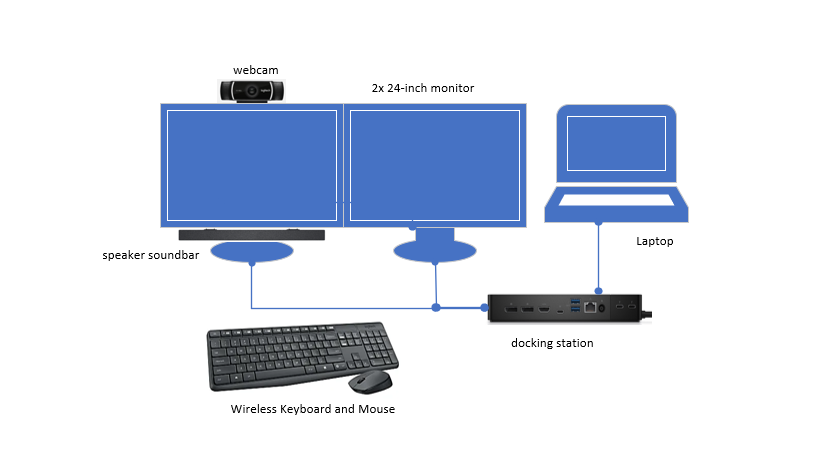
To provide flexibility for employees who need to work from various locations and to ensures that employees have the necessary equipment and security measures in place to maintain productivity and access essential resources while off campus, the College had approved the following setup:
- Laptop (Dell Laptop or Apple MacBook)
- Two 24″ LCD Monitors
- Docking Station (for network and cable management)
- Keyboard and Mouse
- Logitech Camera
- Speaker Sound bar
*All laptops used as primary computers must connect to the wired network while in office.
[/av_textblock]
[/av_one_full]